![Locable Logo 3a3a3a Gray.png]](https://help.locable.com/hs-fs/hubfs/Locable%20Logo%203a3a3a%20Gray.png?height=50&name=Locable%20Logo%203a3a3a%20Gray.png)
Available for the Build, Grow and Coordinate plans on the Locable Marketing Platform
Your Locable website or microsite is very flexible when it comes to design. This article is meant to help you understand a few basics so that you can add pages and apply other changes as needed.
As always, our Support Team is happy to help with any design questions or implementation. If this article concerns you, please contact us directly for assistance.
What Are Custom Classes? A Primer...
Modern websites use HTML, CSS, and JS. Classes can be added to the HTML structure and used for styling and other application.
Custom classes are a simple way to customize the structure of your web pages to enhance the default structure and customize how your content looks on the page. They let you apply styling, spacing, background treatments, or layout adjustments, without needing much technical or coding knowledge.
This article gives you a basic, easy-to-follow overview of how built-in custom classes work and how to apply them.
Using Custom Classes
Think of custom classes like labels you attach to a block of content: Hero, Content Blocks, Columns, Simple Text blocks, and various Embed feeds (Embeddable Resources).
These are applied to one block at a time, which means you can style specific sections without affecting the rest of the page. When added, the system knows how to display that block based on rules that are already set up behind the scenes, or custom rules that have been added to your account.
Custom classes are commonly used to:
-
Add space around content
-
Adjust background colors or sections
-
Create visual separation between sections
-
Improve readability and layout
NOTE: If your website includes custom design elements installed by Locable, our team can also provide you with a separate, personalized guide showing exactly which classes are used on your site and how to use them.
How to Add a Custom Class to a Content Block
Adding a custom class only takes a few steps.
-
Click on the block of content you want to style.
-
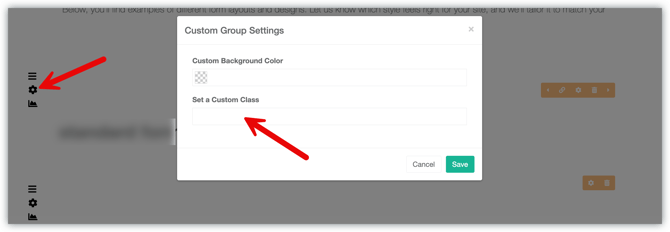
In the content block's toolbar, click the gear icon to open the block settings.
-
Find the field labeled Set a Custom Class.
-
Type the class name into the field.
-
Save the element update.
Once the page is saved, the styling will be applied automatically.
Common Built-In Custom Classes
Every website includes a small set of built-in custom classes that are safe to use and work the same way across sites. These are typically used for basic spacing, layout, and visual structure.
Below are examples of common types of built-in classes you may see and use:
p-t-0
What it does:
Removes extra space at the top of the content block.
When to use it:
Use this when there is too much space above content and you want sections to sit closer together.
p-b-0
What it does:
Removes extra space at the bottom of a column or content block.
When to use it:
Use this when there is too much space below content and you want sections to sit closer together.
m-t-0
What it does:
Removes extra space above a block or section.
When to use it:
Use this when there is too much space between this block and the content above it, and you want them to sit closer together.
Good to know:
This affects spacing outside the block, not the content inside it.
m-b-0
What it does:
Removes extra space below a block or section.
When to use it:
Use this when there is too much space between this block and the content below it.
Good to know:
This affects spacing outside the block and does not remove any content.
m-t-xl
What it does:
Adds extra space above a content block.
When to use it:
Use this when a section needs more visual separation from the content above it, such as before a new section, headline, or callout.Your
NOTE:
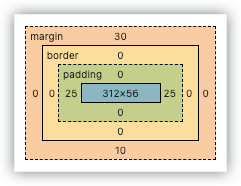
Padding (p-) controls the space inside a content block. This is the space above or below the content, but still within the block itself.
Margin (m-) controls the space outside the content block. This is the space between one block and the blocks around it.
Quick reference:
-
Padding = space inside the block, around the content
-
Margin = space outside the block, between blocks
hide-button
What it does:
Hides the linked button in a column.
When to use it:
Use this when you want the image in a column to act as the clickable link instead of showing a separate button.
parallax
What it does:
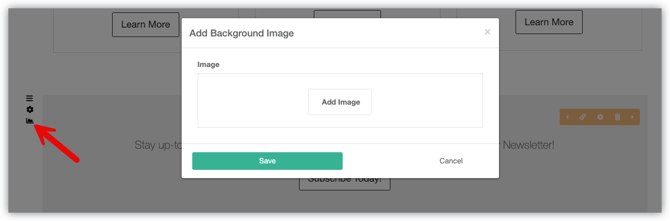
Creates a subtle scrolling effect of the content block's background image, if set.
When to use it:
Use this on sections with background images when you want a more dynamic, visually engaging effect as visitors scroll. Parallax works best on larger background images and should be used sparingly.
narrow-column
What it does:
Narrows the overall width of a content block.
When to use it:
Use this for text-heavy sections to improve readability or when you want content to feel more focused and less wide on the page.
Using More Than One Custom Class
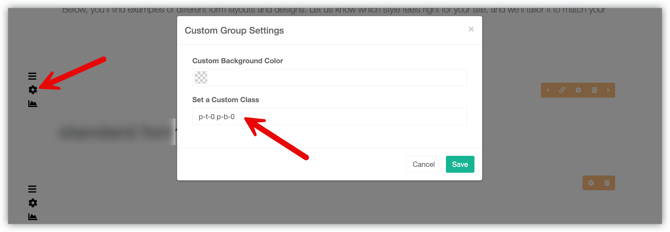
You can apply more than one custom class to the same block if needed. To do this, enter multiple class names in the Custom Classes field, with a single space between each one.
For example: Spacing classes like p-t-0 and p-b-0 are often used together to fine-tune how content lines up within columns or sections.
NOTE: If you're familiar with HTML, you might be inclined to add a period (.) before each class, but that is not necessary in this case.
Keep It Simple
Most content blocks only need one or two custom classes. Using too many can make it harder to keep your design consistent.
Only use class names that have been provided by our team.
Best Practices for Custom Styling & Scripts
For the most reliable, maintainable, and performant results, start with Locable’s built-in blocks and editor settings first. Then layer in reusable classes and centralized styling when additional customization is needed.
Recommended order:
- Use built-in blocks and settings first
This keeps your site easier to edit, update, and support. - Use custom classes for reusable styling
Add custom classes to blocks when you want to create repeatable layouts or visual patterns across your site. - Use site-wide CSS and JavaScript whenever possible
Site-wide assets are preferred because they are centralized, compressed, easier to maintain, and can still target specific pages when needed. - Target specific pages from site-wide CSS when needed
Every custom page includes a unique page ID, allowing page-specific styling while still keeping CSS centralized.Example:
#custom-page_your_page_id .hero-btn {
  background: #0e2b47;
}
- Use page-level CSS or JavaScript sparingly
Page-level customization is supported for unique situations, but should generally be reserved for truly isolated functionality or temporary implementations. - Use custom embeds only for advanced or highly unique layouts
Custom HTML embeds can be useful for complex layouts or advanced use cases. They may also help avoid editor conflicts in some situations. However, malformed HTML, such as unclosed tags, can break page layouts and create difficult-to-debug issues.
What to Avoid
Avoid placing large amounts of inline styles or deeply customized HTML structures directly into content areas unless you are an advanced user with a specific reason.
Inline styles and overly customized page-specific code can:
- Increase page weight
- Reduce reuse across the site
- Limit compression and caching benefits
- Create inconsistent designs across pages
- Make mobile and responsive behavior harder to manage
- Make troubleshooting slower
- Increase the chance of conflicts with future updates
Support & Troubleshooting Note
Locable Support is happy to assist with recommended block-based implementations, reusable custom classes, and centralized CSS or JavaScript approaches.
However, excessive inline styling, malformed HTML, widespread use of !important, duplicated styling logic, or heavily customized page-level implementations may increase troubleshooting complexity and delay issue resolution. In some situations, we may recommend simplifying or refactoring affected areas before additional troubleshooting can continue.
What If My Site Has Custom Design Elements?
Some websites include custom coding from Locable to style elements of your website, using design work that goes beyond the standard built-in classes. If your site has custom styling, we are happy to provide additional details tailored specifically to your website.
We are pleased to provide our Locable website Lookbook to share a variety of packaged styling options that can be applied to elements of content on your website. If you would like any of these styling designs applied to your website, reach out to our Support Team and we can install the proper coding styles in your account.
If you are working with a Locable partner or custom developer, please contact them first for support for your custom design.
When to Contact the Locable Support Team
Custom classes are intended for basic, repeatable styling. Please reach out to our Support Team if you want to:
-
Create a new layout
-
Change the design in a major way
-
Use a custom class you are unsure about
-
Add something that is not covered in your class list
We are always happy to help and make sure changes are applied correctly.