![Locable Logo 3a3a3a Gray.png]](https://help.locable.com/hs-fs/hubfs/Locable%20Logo%203a3a3a%20Gray.png?height=50&name=Locable%20Logo%203a3a3a%20Gray.png)
Available for all plans on the Locable Marketing Platform
Custom Links allow you to add important URLs directly to your Business Profile. These links appear on your profile page in the directory and display with a type-based icon and your custom label.
Why Use Custom Links?
Your Business Profile is often the first place someone learns about your organization on a community's website. Custom Links allow you to guide visitors directly to the actions you want them to take.
Instead of making people search your website, you can place your most important links front and center.
You might use Custom Links to:
-
Send visitors to your event calendar
-
Let customers book appointments or accommodations instantly
-
Promote ticket sales
-
Share your latest blog posts or news
-
Link to a special campaign or important resource
Each link displays with a category-based icon and your own custom label, making it clear and easy for visitors to take the next step.
How to Add a Custom Link
You can add a custom link to your profile by going to About Your Business > Profile and scrolling to the Custom Links section.
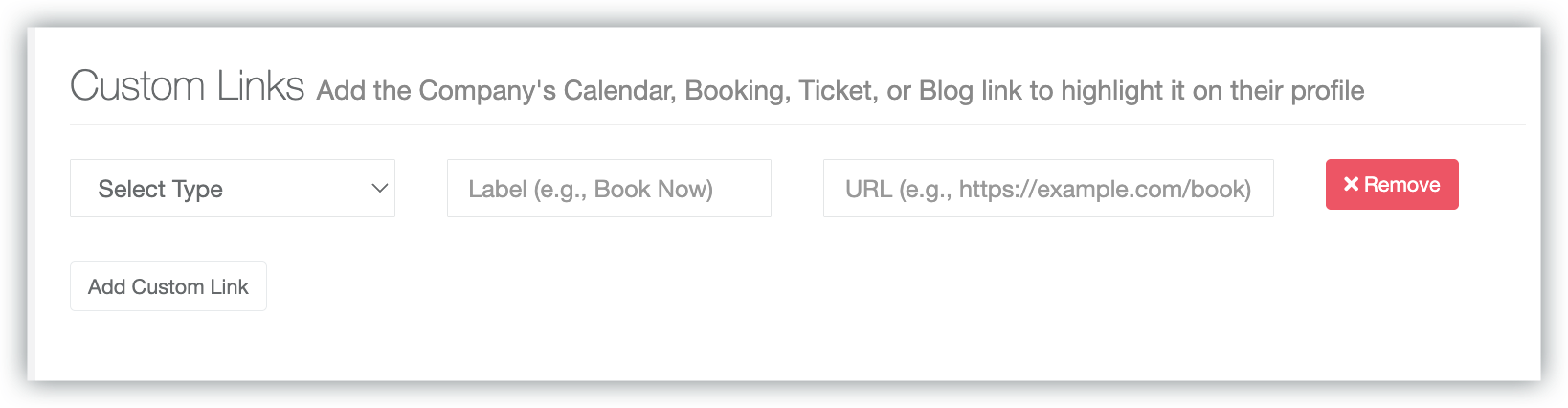
You can add as many custom links as you like!
- Select the Type of Link
- Add a Custom Label that clearly describes the action, such as “Book Now” or “View Upcoming Events.”
- Add the URL to the page the link should take the visitor to
Click 'Add Custom Link' to add additional links to your profile.
To remove a link, select the 'Remove' option within the Custom Links section and confirm.
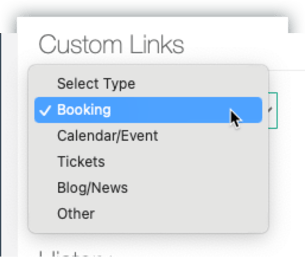
Available Link Types
When adding a Custom Link, you will choose a type. Each type displays with a corresponding icon.
Tips for Best Results
-
Use clear, action-focused labels such as “Book Now” or “View Events.”
-
Link directly to the most relevant page rather than your homepage.
-
Keep labels concise and easy to understand.
Custom Links are a simple way to make your profile more dynamic and drive meaningful engagement from your directory listing.